Loading
Skip to content
Make

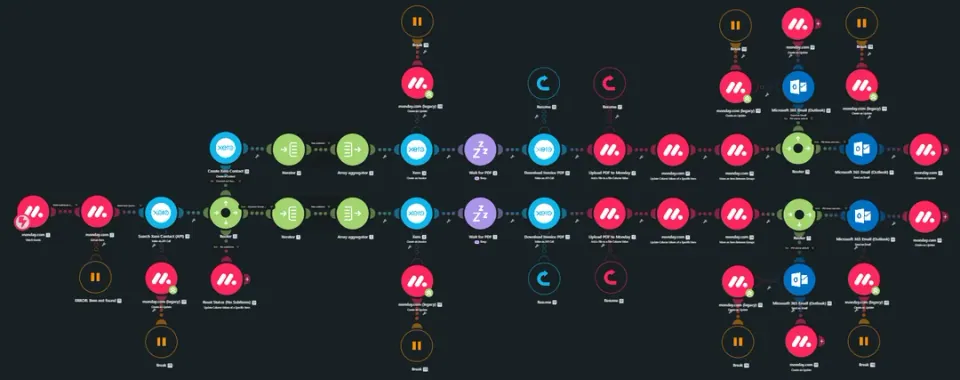
Automated Xero POs, Invoices & Bill Attachments from Monday.com

Built an automated finance workflow that connects Monday.com with Xero to automate purchase orders, client invoices, supplier invoices, and bill attachments.

What this project does

The workflow removes manual data entry between Monday.com and Xero by automatically creating financial documents, transferring PDF files, matching supplier invoices with the correct bills, and keeping both systems synchronized.

  • Make.com
  • Monday.com
  • Xero

How it was put together

Workflow

The system:

  • Creates a Purchase Order in Xero when a PO is approved in Monday.com
  • Transfers all PO line items from Monday.com into Xero
  • Downloads the generated Purchase Order PDF
  • Creates the corresponding Bill in Xero automatically
  • Creates client invoices in Xero using invoice details stored in Monday.com
  • Attaches the generated invoice PDF back to the relevant Monday.com item
  • Emails the completed invoice directly to the client
  • Allows employees to upload supplier invoice PDFs through Monday.com
  • Finds the matching Bill in Xero using the Purchase Order reference
  • Attaches the supplier invoice PDF to the correct Bill in Xero
  • Adds a comment to the Monday.com item when an automation fails

This allows the entire process to run without users needing to manually enter information into Xero or open Make.com to monitor every transaction.

Purchase Orders & Invoices

The workflow automatically handles the complete Purchase Order and client invoice process.

When a Purchase Order is approved in Monday.com, Make.com creates the corresponding Purchase Order in Xero with all required line items and then creates the related Bill.

For client invoices, the invoice information stored in Monday.com is transferred to Xero automatically. The generated PDF is then attached back to Monday.com and the invoice is emailed directly to the client.

Supplier Invoice Management

Supplier invoices are handled through Monday.com.

When an employee uploads a supplier invoice PDF, the workflow identifies the related Bill in Xero using the Purchase Order reference and automatically attaches the supplier document to the correct Bill.

This keeps supplier documentation connected to the correct financial record without requiring manual file uploads inside Xero.

Error Handling & Automation

The workflow includes automated error handling to make the process easier to manage.

If something goes wrong during processing, the relevant Monday.com item is automatically flagged with a comment explaining the issue.

This means the team can identify failed transactions directly from Monday.com instead of having to open Make.com and manually inspect the scenario.

The Purchase Order, client invoice, and supplier invoice workflows have been fully tested and are running in production.

Result

A complete automated finance workflow that connects Monday.com and Xero and removes repetitive manual work from Purchase Orders, client invoices, supplier invoices, and bill attachments.

The system keeps financial records and supporting documents synchronized while providing automated error reporting directly inside Monday.com.

Screenshots

Select an image to view it full size.

Abdullah Bukhari
Full-Stack .NET Engineer & AI Automation Architect

Want a system like this?

Share what you're working with and what should happen. I'll come back with questions and a suggested approach.

bukhariabdullah034@gmail.com

Work you can inspect

  • Lead Handling & Appointment Booking Chatbot: Chatbot
    n8n

    Lead Handling & Appointment Booking Chatbot

    Built a chatbot for a skin treatment clinic to handle leads coming from Facebook Ads and GoHighLevel.

    Read case study
  • Automated Xero POs, Invoices & Bill Attachments from Monday.com: Automated Xero POs, Invoices & Bill Attachments from Monday.com(1)
    Make

    Automated Xero POs, Invoices & Bill Attachments from Monday.com

    Built an automated finance workflow that connects Monday.com with Xero to automate purchase orders, client invoices, supplier invoices, and bill attachments.

    Read case study
  • AI Lead Qualification & Sales Automation: 1 (1)
    Zapier

    AI Lead Qualification & Sales Automation

    Built an end to end lead management and sales automation system that captures leads, enriches their information, scores their potential, routes them to the right…

    Read case study

What happens after you book: 1. We talk for 30 minutes. 2. I map the process and recommend an approach. 3. You decide.